Find Award Flight Availability Automatically: With Claude Code & seats.aero (2026)
Step-by-step guide: How to use Claude Code and the seats.aero API to automatically find Business & First Class availability - instead of searching manually for hours.
Status:
Quick answer: With Claude Code (Anthropic’s AI terminal) and the seats.aero API, you can have award flight availability searched automatically - instead of clicking through airline websites manually for hours. Set it up once, then use it again and again: (1) install Claude Code, (2) get a seats.aero Pro subscription and grab your API key, (3) create a project folder with a .env file, (4) ask Claude for availability. It costs ~€9/month (seats.aero) + ~€18/month (Claude Pro), but it saves you hours of search time.
Anyone who has ever tried to book a Business or First Class award flight knows the problem: you click through airline websites day after day, shift dates by a day, try other departure airports - and still find nothing. Or you find something, but only after 3 hours of searching.
There’s a better way. With Claude Code (Anthropic’s AI terminal) and the seats.aero API, you can automate the search. You tell Claude where you want to go and get an overview of all available award flights in seconds - across dozens of airlines.
In this guide, I’ll show you step by step how to set this up - configure once, then use anytime.
What you need
| Component | Cost | Purpose |
|---|---|---|
| Claude Code | From ~€18/month (Claude Pro) | AI terminal that writes and runs the API queries for you |
| seats.aero Pro | From ~€9/month | Award availability data from 25+ airlines |
| API key | Included in seats.aero Pro | Access to the Partner API for automated queries |
Total cost: ~€27/month. Sounds like a lot? A single Business Class flight you find thanks to better availability saves you thousands of euros. And you save hours of manual search time.
Step 1: Install Claude Code
Claude Code is Anthropic’s official AI terminal. There are several ways to use it:
Option A: Desktop App (recommended)
- Go to claude.ai/download
- Download the app for Mac or Windows
- Install the app and sign in with your Anthropic account (Claude Pro or Max subscription required)
- Done - Claude Code is built into the desktop app
Option B: In the browser (no installation needed)
- Go to claude.ai/code
- Sign in - you can get started right away
Option C: In the terminal (Mac/Linux)
Open the terminal and run this command:
curl -fsSL https://cli.claude.ai/install.sh | shAfter installation, you simply start Claude Code with:
claudeWhat can Claude Code do?
Claude Code is not a regular chatbot. It can:
- Write and run code - directly on your computer
- Query APIs - like the seats.aero API
- Analyze data - filter, sort, and prepare results
- Read files - e.g. your API key from the .env file
You simply state in natural language what you’re looking for, and Claude handles the rest.
Step 2: Get a seats.aero subscription & grab your API key
seats.aero* is the most comprehensive database for award availability worldwide. The service automatically searches the inventories of over 25 miles programs and shows you where Business and First Class seats are available.
Why seats.aero?
| Benefit | Details |
|---|---|
| 25+ airlines | Lufthansa, Swiss, ANA, Singapore Airlines, Cathay Pacific, Emirates and many more |
| Automatic scans | Availability is continuously updated |
| All classes | Economy, Business and First Class |
| Historical data | Spot trends for when seats get released |
| API access | Automated queries via script or AI tool |
How to grab your API key
- Register at seats.aero*
- Get the Pro subscription (from ~€9/month) - only Pro has API access
- Go to Settings → API
- Click “Generate API Key”
- Copy the key - you’ll need it in the next step
Step 3: Set up your project folder (one-time)
So you don’t have to type in your API key every time, you set up a project folder once. You do this only once - after that, you simply open Claude Code in this folder and can get started right away.
Create the folder and .env file
Create a folder on your computer (e.g. flugsuche) and put a file named .env inside it. Here’s how:
Mac (Terminal):
mkdir ~/flugsuche
cd ~/flugsuche
echo 'SEATS_AERO_API_KEY=your-api-key-here' > .env
Windows (PowerShell):
mkdir $HOME\flugsuche
cd $HOME\flugsuche
"SEATS_AERO_API_KEY=your-api-key-here" | Out-File .env -Encoding UTF8
Or manually: Create a folder flugsuche, open a text editor, type the following line, and save the file as .env (with a dot at the beginning!):
SEATS_AERO_API_KEY=your-api-key-hereReplace your-api-key-here with your real API key from Step 2.
Create a CLAUDE.md (optional, but recommended)
Create a file named CLAUDE.md in the same folder. This file automatically tells Claude how to use the API - you then never have to explain it again:
# Flight search with seats.aero

## API access
- API key is in `.env` as `SEATS_AERO_API_KEY`
- API docs: https://developers.seats.aero/reference/getting-started-p
- Base URL: https://seats.aero/partnerapi/search
- Limit: 1,000 calls per day

## Search preferences
- Preferred departure airports: FRA, MUC
- Preferred classes: Business, First
- Always show results as a table with: date, route, airline, class, miles required, program
- Sorting: cheapest first (by miles)
Tip: Adjust the search preferences to your own wishes. For example, you can add more departure airports (ZRH, VIE, BER) or favor certain airlines.
Your folder now looks like this
flugsuche/
├── .env           ← Your API key (never shared)
└── CLAUDE.md      ← Your search preferences (optional)
That’s it for the setup. From now on, you simply open Claude Code in this folder and can search right away.
Step 4: Ask Claude for availability
Open Claude Code in your flugsuche folder:
Terminal:
cd ~/flugsuche
claude
Desktop App: Open Claude Code and select the flugsuche folder as your working directory.
Now you can simply ask - Claude already knows your API key and your preferences:
Simple search
Find Business Class availability from Frankfurt to New York in June 2026.Claude will then:
- Read your API key from the
.envfile - Query the seats.aero API
- Present the results clearly as a table
No typing in an API key, no copying code - just ask.
Multi-airport search
Find all Business and First Class availability
from FRA, MUC, ZRH and VIE to Tokyo (NRT/HND)
for September and October 2026. Direct flights only.
Flexible date search
I want to fly First Class to Tokyo in summer 2026 (June-August).
Which days have availability?
Check all departure airports in Germany and Switzerland.
Find the cheapest award
What is currently the cheapest Business Class award
from Europe to North America? Show me the top 10
sorted by miles required.
Search for a specific airline
Is there Singapore Airlines First Class availability
from Frankfurt or Zurich to Singapore in October 2026?
Compare multiple destinations
Compare the Business Class availability and miles prices
for these 3 destinations from Frankfurt in July 2026:
- New York (JFK/EWR)
- Tokyo (NRT/HND)
- Singapore (SIN)
Which destination has the best price-to-availability ratio?
Only a few miles available
I have 60,000 Miles & More miles.
Which Business Class flights from FRA or MUC
can I book with them in September 2026?
Show me only options under 60,000 miles.
Return flight search
I'm flying to New York on 15 June 2026.
Find me Business Class return flights JFK/EWR → FRA/MUC
between 25 June and 5 July 2026.
Weekend trip
Find Business Class for a weekend trip:
- Outbound: Thursday or Friday
- Return: Sunday or Monday
- Period: May-June 2026
- From Frankfurt or Munich
- Destination: London, Paris or Barcelona
Find a sweet spot
Which long-haul Business Class flights from Europe
currently have the lowest miles prices on seats.aero?
Show me the 15 cheapest options for June-August 2026.
What the result looks like
Here’s a real example: Business Class to New York and First Class to Tokyo - in a single query:
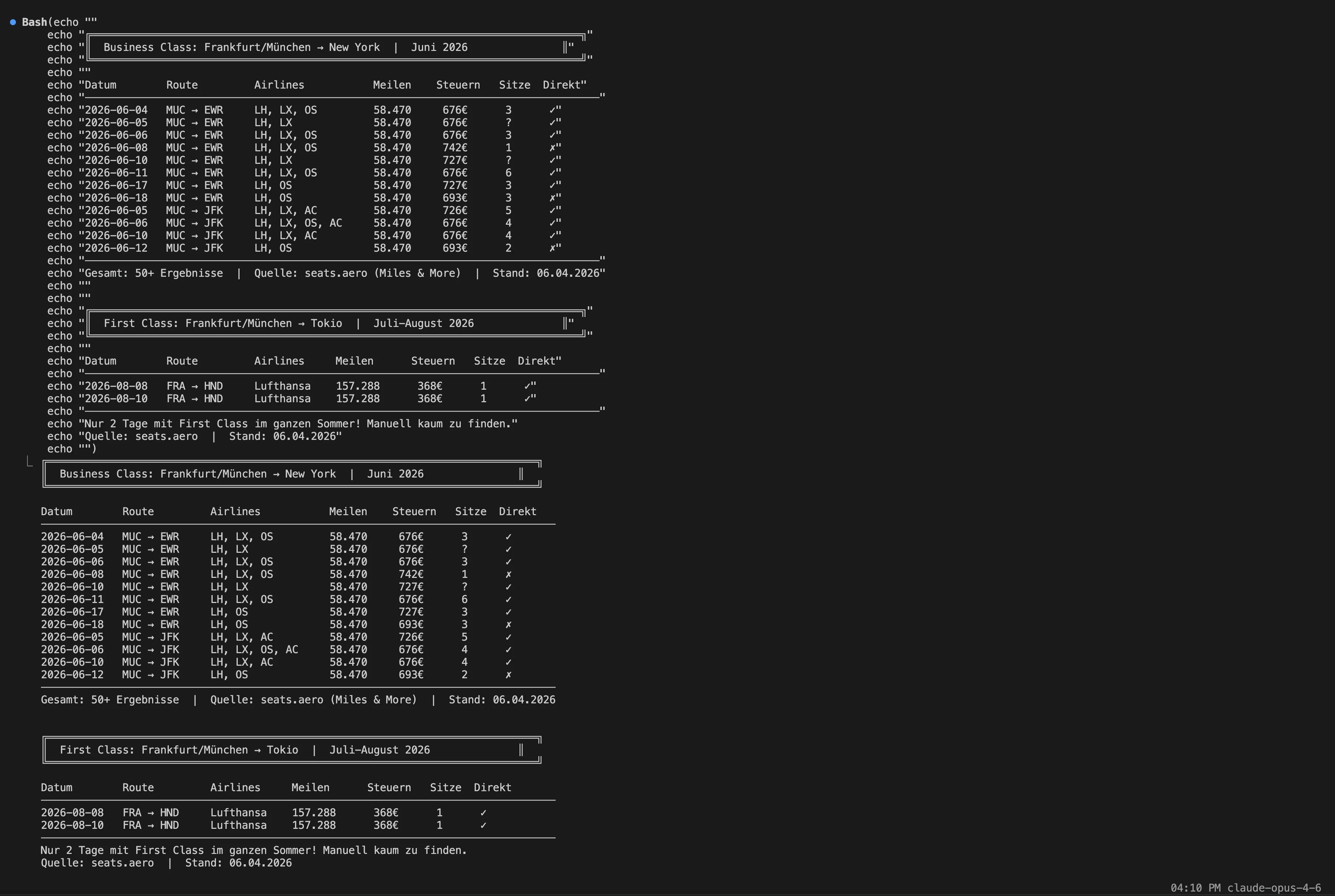
The result immediately shows: Business Class to New York is available on almost every day in June (58,470 miles, €676-742 in taxes). But First Class to Tokyo has only 2 days of availability in the entire summer (8 and 10 August, 1 seat each). Finding that manually would have taken hours.
Important: The seats.aero data is an indicator, not a guarantee. The actual availability can differ - seats get booked, new ones come in, prices change. Use the results as a starting point and always check on the airline website before booking.
Tips for better results
- Multiple departure airports: FRA, MUC, ZRH, VIE, AMS - the more, the more options
- Flexible dates: Have Claude search a whole month instead of single days
- Set filters: “Direct flights only”, “Star Alliance only”, “Max 80,000 miles”
- Search regularly: Availability changes daily
- Adjust CLAUDE.md: Add favorite routes that you search for often
Step 5: Check the results and book
Very important: The seats.aero data is an indicator - not a booking tool and not a guarantee. The displayed availability does not always match the reality on the airline website 1:1. You have to check every result manually before booking.
Why isn’t the data always correct?
- Time lag: seats.aero scans the airlines regularly, but hours can pass between the last scan and your query
- Others book it first: Especially in First Class (often only 1-2 seats), a seat can be gone within minutes
- Prices change: Miles & More uses dynamic pricing - the actual miles required can be higher or lower than displayed
- Program differences: A flight can be bookable with one program but not with another
- Phantom availability: Rarely, seats.aero shows seats that are no longer bookable with the airline
How to book
- Note the route, date and airline from Claude’s result
- Go to the booking page of the respective program:
- Miles & More: miles-and-more.com (for LH Group + Star Alliance)
- British Airways: ba.com (for Avios bookings, also LH Group)
- Singapore Airlines: singaporeair.com (for KrisFlyer)
- Check the availability for exactly this date and route
- Compare the miles prices between different programs
- Book when price and availability are right
Tip: With Miles & More, you often save 30-50% miles when you depart from elsewhere in Europe (e.g. Oslo, Prague, Athens). More on that: Booking award flights: the complete guide
Update August 2026: You can now hand the manual verification to Claude as well - with the official browser extension Claude in Chrome, Claude clicks through the airline website itself and live-verifies your seats.aero finds. It even works from Claude Code (claude --chrome), i.e. in the same chat as your API search. The complete guide with both paths: Claude in Chrome: Your AI Copilot in the Browser for Miles & Award Flights
The everyday workflow (after setup)
Here’s what your search looks like from now on - just 2 steps every time:
- Open Claude Code in the
flugsuchefolder - Ask your question - e.g. “Business Class to New York in June?”
That’s it. No typing in an API key, no clicking around on airline websites, no hours of searching. You ask, Claude searches, you check the best results and book.
Adjusting your search preferences
Want to favor other routes or departure airports? Just change the CLAUDE.md in your folder. Claude reads it automatically on every start.
Cost-benefit analysis
| Item | Cost/month | Savings |
|---|---|---|
| Claude Pro | ~€18 | Hours of manual searching |
| seats.aero Pro | ~€9 | Access to 25+ airlines at a glance |
| Total | ~€27/month | One Business Class award found saves €2,000-8,000 |
Even if you find just one single Business Class flight per year that you would have missed without these tools, the investment has paid off a hundredfold.
Tip: You can also book seats.aero month by month. Only activate it when you’re actively looking for a flight, and cancel again afterward.
Limitations & an honest assessment
This method is no magic trick. A few honest words:
- Availability has to exist - If no award seats are released, no tool will find any
- It costs money - ~€27/month isn’t worthwhile for everyone
- Basic knowledge required - You should understand how miles programs work (Booking award flights: the guide)
- No substitute for flexibility - Flexible dates and routes remain the most important factor
- API limits - seats.aero has a daily query limit (1,000 calls/day on the Pro subscription)
Who is it worthwhile for?
- You’re looking for Business or First Class awards (high value)
- You’re flexible with dates and/or routes
- You search for award flights regularly (not just once a year)
- You want to save time instead of searching manually for hours
Claude Code as a miles all-rounder
Availability search is just one example. Claude Code is generally a powerful tool for everything around earning and redeeming miles - because it can prepare information in a structured way and run the numbers on complex strategies.
What else you can ask Claude Code:
- Plan a card strategy: “I spend €2,000/month and fly long-haul 2x per year. Which card combination earns me the most miles?”
- Compare transfer partners: “I have 80,000 AMEX MR. Which transfer partner gives me the best value for Business Class to Bangkok?”
- Run the numbers on welcome bonuses: “Calculate the total value of all welcome bonuses if I apply for AMEX Gold + Platinum + PAYBACK AMEX. What does it cost me and what do I get for it?”
- Evaluate redemption options: “I have 120,000 M&M miles. Show me the 5 best redemption options by cents-per-mile value”
- Optimize trip planning: “We’re 2 people and want to fly Business Class to Japan in October. Which miles programs and routes are cheapest? Also consider departing from abroad”
The advantage over a normal Google search: Claude can analyze your specific situation - your miles account, your cards, your budget - and derive a personalized strategy from it.
Need help with the setup?
If you need support with the setup or want to find the best redemption strategy for your miles together: In the 1:1 miles coaching, we set everything up together - from card strategy through Claude Code to the concrete booking of your dream flight.
- Starter Coaching (60 min, €249) - basics, setup, your personal plan
- Pro Coaching (120 min, €449) - deep dive with booking strategy and optimization
With the code START25, you save 25% on both options. To the coaching →
No miles yet? Here’s how to earn enough fast
The best awards are useless without enough miles in your account. With the right credit cards, you earn enough fast for Business and First Class:
| Card | Welcome bonus | Enough for |
|---|---|---|
| AMEX Platinum Business* | 250,000 MR | First Class Tokyo round-trip |
| AMEX Platinum Personal* | 85,000 MR | Business Class USA one-way |
| AMEX Business Gold* | 50,000 MR | Business Class Europe round-trip |
| AMEX Gold* | 50,000 MR | Business Class Europe round-trip |
All cards in detail: Credit cards with a welcome bonus 2026
Frequently asked questions (FAQ)
Do I need programming skills for Claude Code?
No. Claude Code understands natural language. You simply write what you’re looking for (e.g. “Find Business Class to Tokyo in June”), and Claude writes and runs the code itself. You don’t have to program anything.
What does seats.aero cost?
The Pro subscription costs from ~€9/month (or ~€92/year) and includes API access. You can book month by month and cancel anytime. There’s also a free basic account, but without API access - then you have to search manually on the website.
Can I book directly with it?
No. seats.aero only shows you the availability. The actual booking you always do directly with the airline or the miles program (e.g. Miles & More, British Airways, Singapore Airlines). Always re-check the availability manually before booking.
Which airlines are covered?
seats.aero covers over 25 airlines and miles programs, including Lufthansa (Miles & More), Singapore Airlines, ANA, Cathay Pacific, Emirates, British Airways, Air France/KLM and many more. You’ll find the exact list on the seats.aero website.
How current is the data?
The data is continuously updated, but it’s always a snapshot. Several hours can pass between the seats.aero scan and your query. That’s why a manual check on the airline website before booking is mandatory.
Is it worthwhile for Economy Class?
Not really. The effort pays off mainly for Business and First Class, where the miles savings versus the cash price are €2,000-8,000. For Economy Class, you’ll usually find availability quickly straight on the airline website.
Do I have to repeat the setup every time?
No, that’s the whole point. You set up the project folder with .env and CLAUDE.md once. After that, you simply open Claude Code in this folder and can search right away - your API key and preferences are automatically there.
How many API calls do I have per day?
The Pro subscription includes 1,000 API calls per day. A typical search (one route, one month) needs 1-5 calls depending on complexity. So you can easily query dozens of routes per day.
Conclusion: Set up once, use again and again
The combination of Claude Code and seats.aero isn’t a must - but it’s a huge time saver for anyone who regularly searches for premium award flights. Instead of clicking through airline calendars for hours, you get an overview of all available options in seconds.
Summary - one-time setup:
- Install Claude Code - desktop app, browser or terminal
- Get seats.aero Pro - generate the API key (from ~€9/month)
- Create a project folder -
.envwith API key +CLAUDE.mdwith preferences
From then on, just every time:
- Open Claude Code in the project folder
- Ask - “Business Class to Tokyo in June?”
- Check the results on the airline website and book
If you’re just getting started and first want to understand how award flights work, read this first: Booking award flights: the complete guide for beginners
All strategies in the Premium Bundle
14 chapters + audiobook (2:07h) with the complete system for 500,000+ points in your first year.
Get it now for just 99€
MEILENKÖNIG
Expert for miles, points, and credit card strategies. Helps travelers fly business & first class for a fraction of the price.